A Practical Guide to use Context Caching
Dec 21, 2025 · 5 minutes read · Follow @luixaviles

If you’ve built an LLM-based application, you’ve likely faced “The Context Problem”: providing enough information to the model to get a good answer often means sending massive amounts of text with every single request.
In a recent project, ElectoBot, I built a tool to help citizens compare government plans from different presidential candidates. Each candidate has a dense PDF/Markdown document detailing their proposals. Sending 50 pages of “Government Plan” text for every user question? That’s slow and expensive.
The typical solution is RAG (Retrieval-Augmented Generation) with a Vector Database. But for this use case I found a simpler, more efficient approach: Gemini’s Context Caching.
Here is how I implemented a production-ready caching strategy using Node.js, eliminating the need for complex database infrastructure.
The Architecture
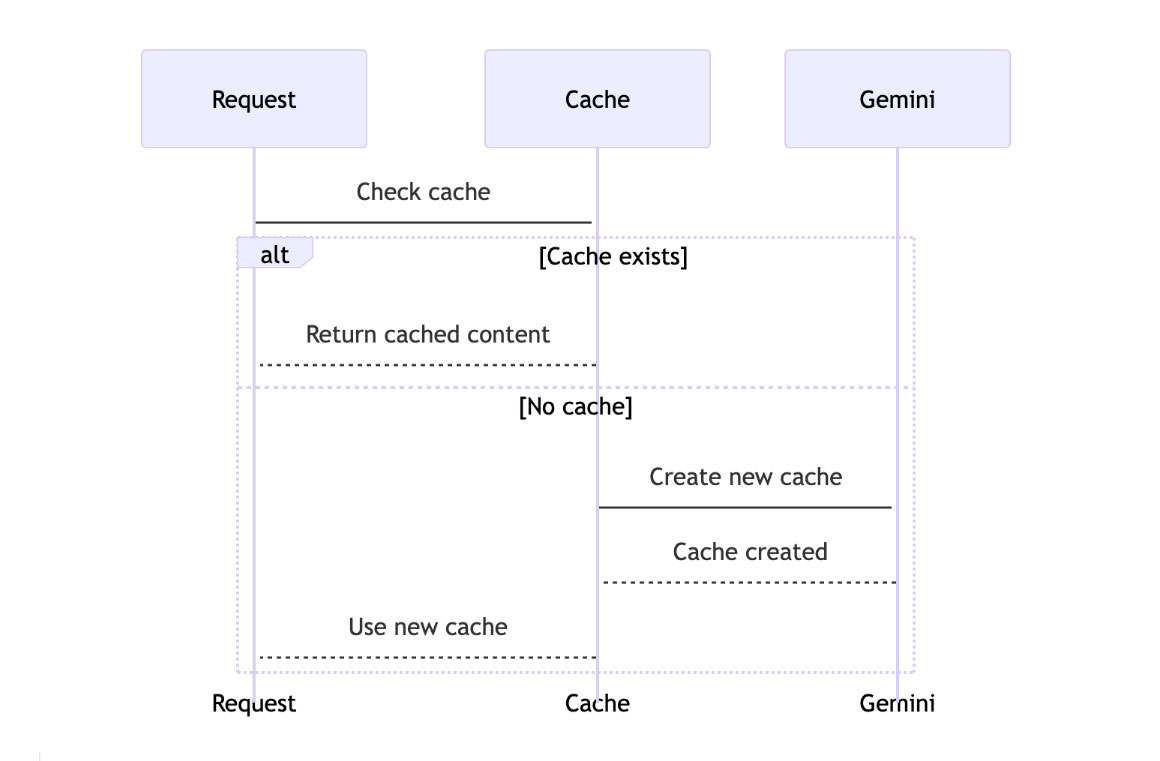
The goal was simple: When a user asks about a specific political party (e.g., “What does Party X propose for education?”), the backend should:
- Check if we already have an active “Session” (Cached Context) for that party.
- If yes, use it.
- If no, upload the document to Gemini, cache it, and then use it.
Instead of storing these sessions in a database like Redis, I used an In-Memory Map. Why?
- Simplicity: No external dependencies.
- Speed: Instant lookups.
- Scope: The cache is shared across all users. If User A asks about “Party X”, User B benefits from the already cached context 5 seconds later.
Here is the high-level flow:
Step 1: The Source of Truth
First, I treated the file system as my knowledge base. The government plans are stored as Markdown files in the server/programs/md/ folder.
This makes the system incredibly easy to update: just drop a new .md file, and the application is ready.
export const candidateProposals = [
    {
        candidateName: "Candidate Name",
        politicalParty: "Political Party",
        proposalContentPath: "programs/md/political-party-proposal.md"
    },
    // ... other candidates
];
Step 2: Implementing Explicit Caching
The core logic resides in ProposalService. We use the Google GenAI SDK to create a cache.
Notice the ttl (Time-To-Live). This is crucial. It tells Gemini how long to keep this context alive. I configured this via environment variables (GEMINI_CACHE_TTL) to easily adjust cost vs. performance.
// ... imports

// 1. The In-Memory Cache Map
const cachedContentMap = new Map<string, CachedContent>();

export class ProposalService {

  private async getCachedContent(politicalParty: string): Promise<CachedContent> {
    // 2. Check if we already have it in memory
    if (cachedContentMap.has(politicalParty)) {
      console.log(`CachedContent for "${politicalParty}" has been found.`);
      return cachedContentMap.get(politicalParty)!;
    }

    // 3. If not, load the file and create the cache
    console.log(`CachedContent for "${politicalParty}" not found. Creating...`);

    // ... (logic to find candidateInfo) ...

    const proposalPath = path.join(process.cwd(), candidateInfo.proposalContentPath);
    const proposalContent = await fs.readFile(proposalPath, 'utf-8');

    // Create the System Instruction with the full document
    const systemInstruction = generateProposalAssistantPrompt(
      candidateInfo.candidateName,
      candidateInfo.politicalParty,
      proposalContent
    );

    // 4. Call Gemini API to create the cache
    const createCacheParams: CreateCachedContentParameters = {
        model: MODEL_NAME,
        config: {
          systemInstruction: systemInstruction,
          ttl: config.geminiCacheTTL, // e.g., '1800s' (30 mins)
        },
    };
    const cache = await this.genAI.caches.create(createCacheParams);

    // 5. Save to our Map
    cachedContentMap.set(politicalParty, cache);
    return cache;
  }
}
Step 3: Consuming the Cache
Once the cache is created, we get a reference (a name string). We pass this reference to subsequent generateContent calls instead of sending the text again.
private async getProposalForCandidate(politicalParty: string, question: string) {
  const cache = await this.getCachedContent(politicalParty);

  const generateContentParams: GenerateContentParameters = {
    model: MODEL_NAME,
    contents: [{ role: 'user', parts: [{ text: question }] }],
    config: {
      cachedContent: cache.name, // <--- The Magic happens here
      temperature: 0.5, // <-- Make it deterministic
      responseMimeType: 'application/json',
      responseSchema: jsonSchema,
    },
  };

  const result = await this.genAI.models.generateContent(generateContentParams);
  // ... handle result
}
Step 4: The Retry Pattern (Handling Expiration)
This is the most critical part of a production implementation.
Contexts expire. The TTL runs out. If your server is running for days, your cachedContentMap might still hold a reference to a cache that Gemini has already deleted on their end.
If you try to use an expired cache, the API throws a 404 CachedContent not found error. You must handle this gracefully.
My solution is a robust Retry Pattern:
- Try to generate content.
- Catch any error.
- If the error says “CachedContent not found”:
- Delete the entry from our local
Map. - Retry the operation (which will trigger a fresh
caches.create).
- Delete the entry from our local
public async compareProposals(candidates: Candidate[], question: string) {
  const proposalPromises = candidates.map(async (candidate) => {
    try {
      return await this.getProposalForCandidate(candidate.politicalParty, question);
    } catch (error: any) {

      // The "Self-Healing" logic
      if (error.message?.includes('CachedContent not found')) {
        console.log(`CachedContent for "${candidate.politicalParty}" has expired. Retrying...`);

        // Invalidate local cache
        cachedContentMap.delete(candidate.politicalParty);

        // Recursively retry
        return await this.getProposalForCandidate(candidate.politicalParty, question);
      }
      throw error;
    }
  });

  return Promise.all(proposalPromises);
}
Configuration
Finally, making the TTL configurable is essential. In environment.ts, I mapped it to an environment variable. This allows me to increase the cache duration during high-traffic events (like election day) or decrease it during development.
// environment.ts

export const config = {
  // ...
  geminiModel: process.env.GEMINI_MODEL || 'gemini-3-flash-preview',
  geminiCacheTTL: process.env.GEMINI_CACHE_TTL || '1800s', // Default: 30 minutes
} as const;
Conclusion
Context Caching is a game-changer for applications with “heavy” but static context. By moving the context management to the model provider (Gemini) and managing the session references in a simple Node.js Map, we achieved:
- Lower Latency: No need to re-upload or re-process 50 pages of text.
- Lower Costs: Cached tokens are significantly cheaper than repeated input tokens.
- Simpler Architecture: No Vector DB, no embeddings pipeline.
Sometimes the best database is no database at all.
You can follow me on Twitter and GitHub to see more about my work.
Thank you for reading!
— Luis Aviles