How to Safely Automate Unit Test Generation Using AI Sandboxes
Writing tests, debugging errors, and opening Pull Requests with a fully autonomous agent.
Jun 10, 2026 · 5 minutes read · Follow @luixaviles
In my previous post, I introduced nebubox, a CLI tool I built to run AI coding tools (like Claude Code, Antigravity, and Codex) safely inside Docker containers. By restricting the filesystem access of the agent to just your project directory, you get the productivity gains of autonomous coding without risking your SSH keys, env files, or other local repositories.
Today, we are taking this setup a step further to run a fully autonomous coding workflow. In this post, let’s look at how to orchestrate the Antigravity CLI to inspect our code, write missing unit tests, verify them against Vitest, and open a GitHub Pull Request (all safely contained within a sandboxed environment).
The Goal: 100% Test Coverage
For this demo, we’ll target our own command-line interface entry point: src/cli.ts. Currently, this file has around 35.38% statement coverage. Our goal is to have the AI agent raise this coverage to 100% and submit a PR for our review.
To do this, we can use two key features:
- Fully Autonomous Execution (
/goal): Let the agent run, test, and self-correct without prompting you for every change. - GitHub CLI Integration (
--github): Mount your host’sghcredentials securely inside the container so the sandboxed agent can push branches and open PRs.
The Architecture: A Secure Agent Sandbox
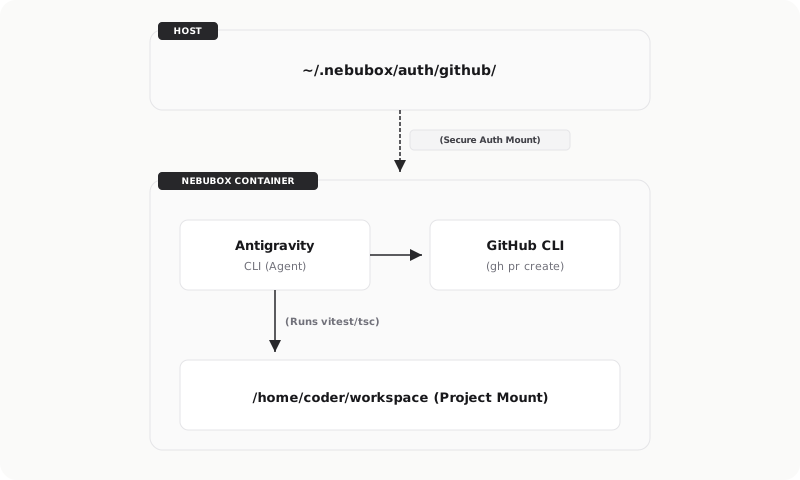
Before we write any commands, let’s see how these tools work together:
When you run Antigravity inside a Nebubox container, the agent executes in a sandboxed environment that only has visibility of your active project directory. If the agent needs to open a Pull Request, it talks to the container’s GitHub CLI (gh). Nebubox securely mounts your host’s GitHub CLI configuration directory into the container, so Git operations succeed without exposing your host’s files.
Step 1: Starting the Sandbox
First, let’s prepare a clean branch in our host repository. Run the following command on your terminal:
git checkout main
git checkout -b test/cli-coverage
Next, let’s start the Nebubox container with the Antigravity CLI and the GitHub CLI integration flags enabled. Run the following command on your terminal:
npx nebubox start ./ --tool antigravity --github
When Nebubox builds the secure Docker image, it configures our Git identity inside the container using the host’s authenticated credentials, mounts our repository root at /home/coder/workspace, and opens an interactive bash shell.
Step 2: The Agentic Goal
Once inside the sandboxed shell, let’s launch the agent tool and initiate the autonomous mode. Run the following command on your terminal:
# Launch the agent tool in the container (YOLO mode)
agy --dangerously-skip-permissions
To trigger the autonomous workflow, run the /goal command inside the interactive agent prompt:
/goal Analyze the unit test coverage for src/cli.ts. \
  Write comprehensive mock-based unit tests in src/index.test.ts \
  to cover all command routing and error paths, aiming for 100% coverage. \
  Verify the tests pass using Vitest, and open a Pull Request \
  using the GitHub CLI when complete.
Using the /goal command, the agent begins a cycle of analysis, drafting, execution, and debugging until the goal is met.
Step 3: Self-Correction in Action
Instead of stopping at the first compiler or runtime error, the agent runs the test runner, reads the feedback, and corrects its code automatically.
For instance, during the run, the agent wrote tests to check the -h (help) and -v (version) short flags. However, Vitest threw the following error:
FAIL  src/index.test.ts > main CLI functionality > prints help when -h is provided
Error: process.exit(1)
 ❯ Module.main src/cli.ts:159:15
The agent analyzed the stack trace and inspected src/cli.ts. It recognized that because the arguments parser (parseArgs) only parses flags starting with --, the short flags -h and -v were being treated as positional arguments. This caused the CLI switch-case to hit the default block and exit with code 1.
To solve the problem, the agent updated the src/cli.ts file as follows:
if (flags['help'] || flags['h'] || command === 'help')
And here is the updated version:
if (flags['help'] || flags['h'] || command === 'help' || command === '-h')
When the agent ran the test runner again, it successfully verified 100% coverage for the CLI module:
| File | % Stmts | % Branch | % Funcs | % Lines |
|---|---|---|---|---|
| All files | 93.43 | 92.19 | 97.91 | 93.26 |
↳ src/ |
100 | 100 | 100 | 100 |
↳ cli.ts |
100 | 100 | 100 | 100 |
Table 1: Test coverage report showing 100% coverage achieved for src/cli.ts.
Step 4: Securely Submitting the PR
Once the tests pass and coverage is satisfied, the agent handles the Git operations. Since Nebubox maps the host’s gh credentials into the sandbox safely, the agent runs the Git command sequence as follows:
git add src/cli.ts src/index.test.ts package-lock.json
git commit -m "test: achieve 100% test coverage for cli.ts"
git push -u origin test/cli-coverage
gh pr create --title "test: achieve 100% test coverage for cli.ts" --body "..."
Within seconds, the agent opens the PR on the remote repository without ever accessing the rest of the host computer.
Conclusion
You can run autonomous coding agents in your projects without security risks. By wrapping the agent inside Nebubox, we can safely let the agent run its closed-loop execution to write tests, fix bugs, and open PRs.
Find the complete project in this GitHub repository: nebubox. Do not forget to give it a star and start sandboxing your own AI coding agents safely.
You can follow me on Twitter and GitHub to see more about my work.
Thank you for reading! — Luis Aviles