How to Speed Up Test Coverage Using Multi-Agent Orchestration
Scale your unit test generation by running Antigravity CLI subagents concurrently in a secure container sandbox.
Jun 16, 2026 · 5 minutes read · Follow @luixaviles
In Part 1 of this series, we looked at how to run a single, autonomous AI agent inside a Nebubox container to generate unit tests, patch bugs in our CLI code, and open a Pull Request.
That sequential, closed-loop workflow works great for smaller modules. But as codebases grow, forcing a single agent to write extensive test suites line-by-line can be slow, hitting context window limits and increasing execution time.
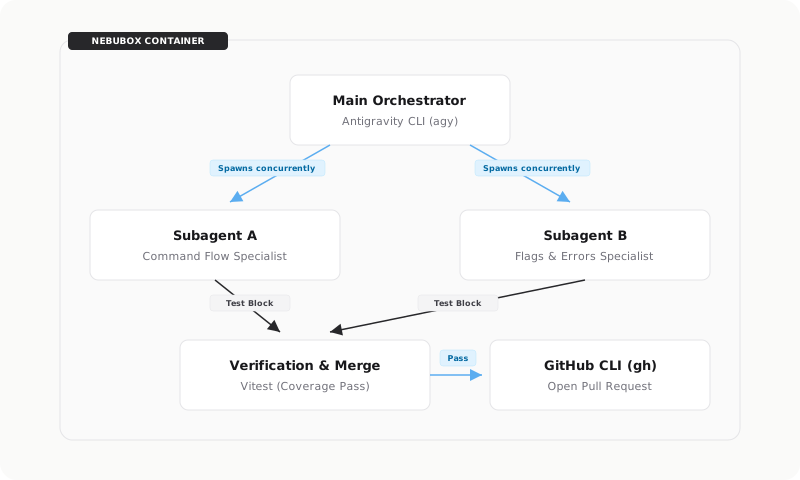
To solve this, we can scale our workflow horizontally. In this post, let’s look at how the Antigravity CLI can orchestrate parallel subagents to divide and conquer test generation concurrently, merging their work before running verification.
The Architecture: Multi-Agent Parallel Orchestration
Instead of one agent working sequentially, the main agent acts as an Orchestrator. It inspects the target file (src/cli.ts), designs the test requirements, and spawns child agents (subagents) to work on different segments in parallel:
Step 1: Branch Preparation
First, let’s prepare a clean branch in our host repository. Run the following command on your terminal:
git checkout main
git checkout -b test/cli-coverage-parallel
Next, let’s start the Nebubox container with the Antigravity CLI and the GitHub CLI integration flags enabled. Run the following command on your terminal:
npx nebubox start ./ --tool antigravity --github
Step 2: Spawning the Subagents
Once inside the sandboxed shell, let’s launch the agent tool and initiate the autonomous mode. Run the following command on your terminal:
# Launch the agent tool in the container (YOLO mode)
agy --dangerously-skip-permissions
To trigger the parallel workflow, run the /goal command inside the interactive agent prompt:
/goal Achieve 100% test coverage for src/cli.ts using Vitest. \
  Spawn two parallel subagents to generate the test cases concurrently: \
  one for the positive path command routing, and another for \
  edge cases, flags, and errors. Once they finish, merge their \
  blocks into src/index.test.ts, verify coverage, and open a Pull Request.
Once triggered, the parent agent acts as the coordinator: it maps out the file’s coverage gaps, divides them into separate contexts, and spawns the child agents. Under the hood, the Orchestrator executes two parallel child sessions with these exact prompts:
Subagent A (Command Flow Specialist)
- Role:
Command Flow Test Generator - Prompt:
“Write Vitest test cases that cover the positive path routing for the commands inside
src/cli.ts. Specifically, test that valid calls to ‘start’, ’list’, ‘stop’, ‘attach’, ‘remove’, and ‘build’ commands run their respective handler functions with the correct argument mappings. Assume that process.exit is mocked to throw an error, and all command modules are mocked. Return only the code block containing the Vitest test cases (within adescribe('command routing', ...)block) that can be merged intosrc/index.test.ts. Do not include imports or outer setup unless necessary.”
Subagent B (Edge Cases & Flag Specialist)
- Role:
Flags and Errors Test Generator - Prompt:
“Write Vitest test cases that cover the flags, help/version paths, and exception handling logic in
src/cli.ts. Specifically, test:- Printing help when –help, –h, or ‘help’ command is provided.
- Printing version when –version, –v, or ‘version’ command is provided.
- Exit behavior when no command is provided.
- Error handling when a command handler throws a NebuboxError or generic Error, and when it rejects with a non-Error object.
Assume that process.exit is mocked to throw an error. Return only the code block containing the Vitest test cases (within a
describe('flags and errors', ...)block) that can be merged intosrc/index.test.ts. Do not include imports or outer setup unless necessary.”
Both subagents run concurrently, splitting the workload and drafting their assigned test blocks in parallel.
Step 3: Merging & The Verification Loop
As the subagents complete their drafts, they return the test code blocks to the main Orchestrator.
Because the subagents worked in parallel, the Orchestrator’s role shifts to integration. It automatically merges the code blocks from Subagent A and Subagent B into src/index.test.ts.
To verify the merged tests and coverage inside the container, the Orchestrator automatically executes the test suite:
# Executed automatically by the Orchestrator during verification
npm run test:coverage
If any edge cases are missing (like a command failing when a positional argument is missing), the Orchestrator runs a quick self-correction loop to patch the test file. Once completed, we hit 100% statement, branch, function, and line coverage for our CLI module:
| File | % Stmts | % Branch | % Funcs | % Lines |
|---|---|---|---|---|
| All files | 93.43 | 92.08 | 97.91 | 93.26 |
↳ src/ |
100 | 100 | 100 | 100 |
↳ cli.ts |
100 | 100 | 100 | 100 |
Table 1: Test coverage report showing 100% coverage achieved for src/cli.ts.
Step 4: The Final PR
Once the verification is green, the Orchestrator uses the mounted GitHub CLI to commit, push the branch, and create the Pull Request automatically:
# Executed automatically by the Orchestrator to submit the PR
git add src/index.test.ts
git commit -m "test: achieve 100% test coverage for cli.ts using parallel subagents"
git push -u origin test/cli-coverage-parallel
gh pr create --title "test: achieve 100% test coverage for cli.ts using parallel subagents" --body "..."
The PR is opened cleanly on the remote repository.
Key Takeaways
- Divide and Conquer: Spawning subagents lets you split a large test suite into smaller, isolated scopes. Running them concurrently means the draft code is generated in a fraction of the time compared to a single agent working sequentially.
- Orchestrated Merging: A parent agent acts as the integration compiler. It merges code blocks, runs the test suite, and debugs runtime exceptions, preventing broken code from ever reaching the PR.
- Container Security: Running multiple AI agents in parallel multiplies the risk of untrusted code execution. Isolating the session inside a Docker container ensures the agents can install packages and run shell commands without host exposure.
Multi-agent concurrency is a highly efficient way to scale test coverage, but only if you can install dependencies and run test suites safely. By wrapping your orchestrator and subagents inside a Docker-based sandbox like Nebubox, you get the speed of parallel execution without compromising your host machine’s security.
Find the complete project in this GitHub repository: nebubox. Do not forget to give it a star and start sandboxing your own AI coding agents safely.
You can follow me on Twitter and GitHub to see more about my work.
Thank you for reading!
— Luis Aviles