Parallel Full-Stack Upgrades with /swarm in Antigravity CLI
Run multiple Antigravity CLI agents in parallel with Gemini 4 Neon using Git worktrees and a shared message board.
Nov 25, 2026 · 7 minutes read · Follow @luixaviles
Google Antigravity recently released /swarm (in preview) alongside Gemini 4 Carbon, letting you run a group of agents together directly from the Antigravity CLI and app. Shortly after, Gemini 4 Neon rolled out as a faster, lower-cost model built for everyday coding tasks.
In a previous post, we looked at how parallel subagents in Antigravity CLI can speed up unit test generation on a single file. Upgrading an entire full-stack repo across backend, frontend, tests, and docs is a different story. When a single agent works through a long list of changes step by step, it takes much longer, fills up its context window, and leaves you with one giant diff to review.
I wanted to see how /swarm and Gemini 4 Neon behave, so I tried a full-stack upgrade on my Pet Shelter App (Angular 21, Express, and Firebase). Using Gemini 4 Neon (Medium) across the whole swarm, six agents split the work through a shared message board and separate Git worktrees. In about 12 minutes, they updated more than 40 files and got 31 tests passing with zero merge conflicts.
In this post, let’s look at how /swarm works, how we divided the files so agents would not edit the same code, and how Git worktrees kept the final Pull Request clean.
The Architecture: Coordinator, Shared Board, and Worktrees
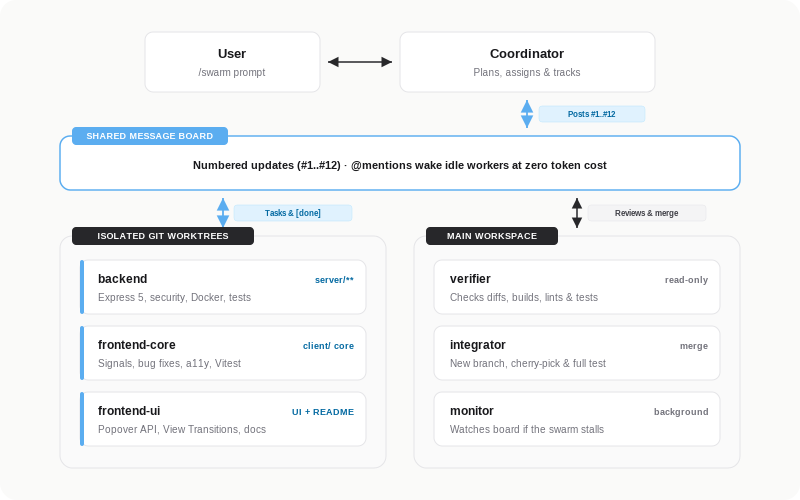
A /swarm session is organized around a Coordinator and a group of Workers, each running in its own conversation:
- Coordinator. The only agent that talks directly to you. It breaks down the work, assigns tasks, tracks progress, and decides what runs next without editing files itself.
- Shared Message Board. Every task assignment, update, and completion note shows up as a numbered message (
#1,#2, up to#12). When a worker has nothing to do, it pauses at zero token cost until another agent mentions it by name (like@verifier). In the Antigravity CLI, you can also open the live terminal board anytime with/swarm boardorAlt + Sto follow messages and tool activity in real time. - Separate Worktrees. Workers that edit code at the same time each get their own isolated Git worktree automatically. Workers that only review diffs or handle the final merge run directly in your main workspace.
Step 1: Reviewing the Project and Splitting File Ownership
Before starting a swarm, let’s ask the agent to inspect the project right inside the Antigravity CLI:
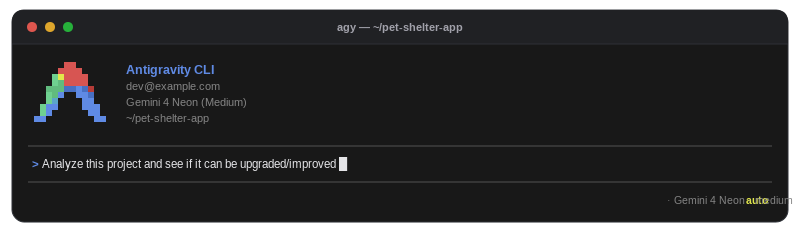
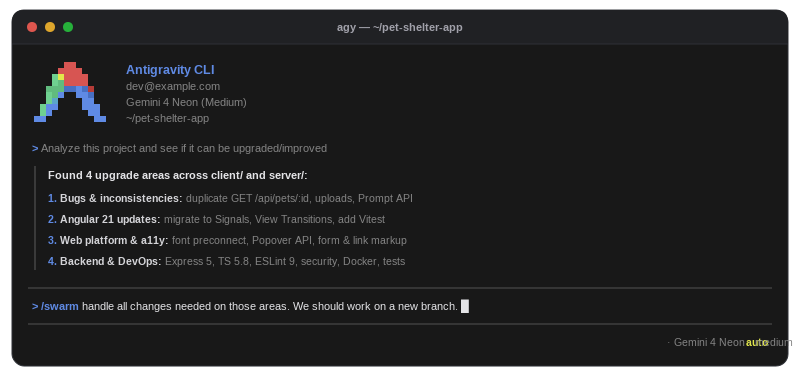
The agent checks both client/ and server/ and comes back with a four-part upgrade plan:
- Bugs and inconsistencies. Duplicate
GET /api/pets/:idrequests, a mismatch wheredescriptionwas required on the server but optional in the form, hardcoded.pnguploads, and unclosed Chrome Prompt API sessions. - Angular 21 updates. Replacing RxJS and
ChangeDetectorRefboilerplate with Signals, enabling router View Transitions, and adding Vitest. - Web platform and accessibility. Font preconnect, the native Popover API for dropdowns and toasts, and cleaner form and link markup.
- Backend, security, and DevOps. Express 5, TypeScript 5.8, ESLint 9, Helmet/CORS/rate-limiting, Dockerfile cleanup, and server tests.
Now, with that plan in the chat history, let’s start the swarm right from the Antigravity CLI composer:
The main rule when running coding agents in parallel is simple: make sure no two agents edit the same file. The coordinator turns those four upgrade areas into five initial workers, giving each one a clear set of files:
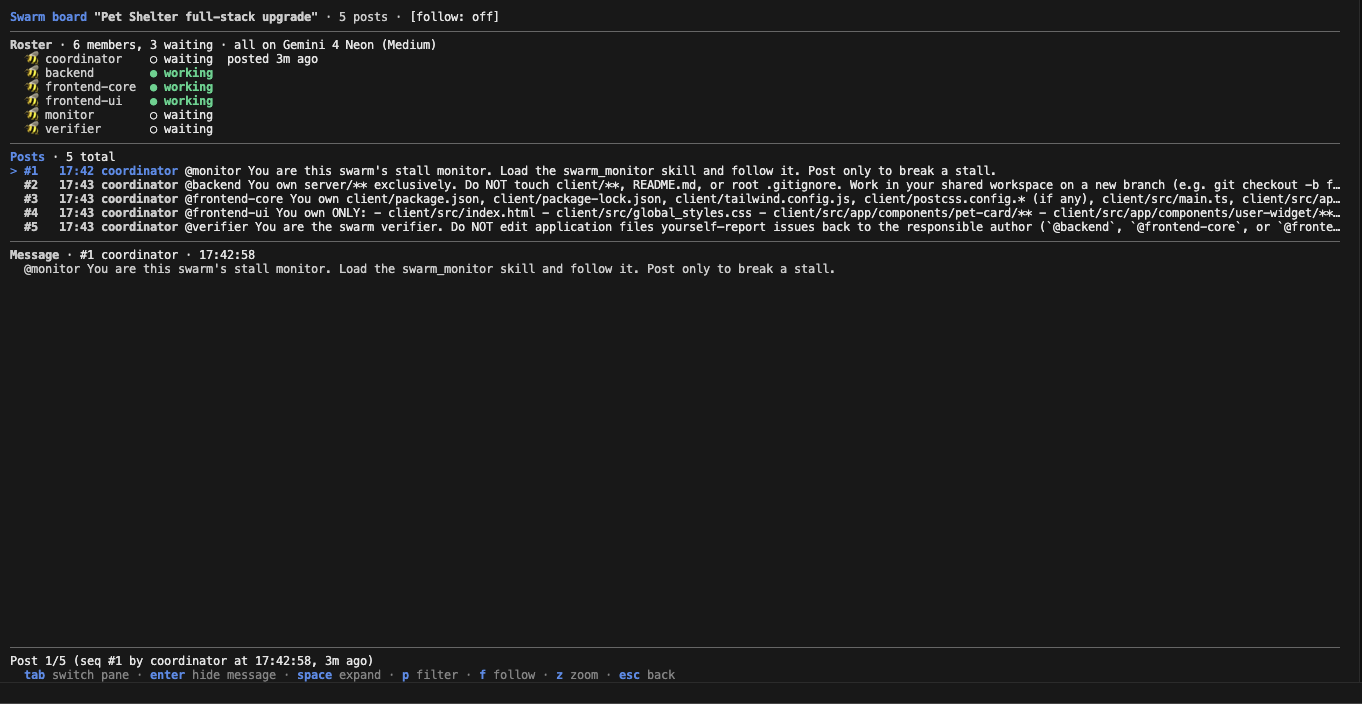
backend(isolated worktree). Owns everything underserver/**(Express 5, security middleware, upload and concurrency fixes, Dockerfile, and server tests).frontend-core(isolated worktree). Ownsclient/package.json,main.ts, services, and core components (app,pet-list,pet-detail,add-pet) for Signals, bug fixes, accessibility, and Vitest.frontend-ui(isolated worktree). Ownsindex.html,global_styles.css,pet-card,user-widget,toastcomponents, andREADME.mdfor font preconnect, Popover API, and View Transitions.verifier(main workspace). Read-only reviewer that checks diffs, confirms each worker stayed in its assigned files, and runs builds, lints, and tests.monitor(main workspace). Watches the board in the background and only steps in if the swarm gets stuck.
Pay attention to how shared features work without touching the same files. Both frontend-core (pet-detail) and frontend-ui (pet-card) needed to support CSS View Transitions so clicking a pet card smoothly animates its image into the detail page. Instead of letting two workers edit the same files, the coordinator simply gave both workers the same naming rule (view-transition-name: pet-image-<id>) in their task descriptions, so each one updated its own template safely.
Also, keep in mind that every worker starts with a blank chat. It only sees the instructions the coordinator gives it, so being explicit about which files to edit, which files to leave alone, and how to verify the changes keeps agents from wandering outside their scope.
Here is what the live /swarm board view looked like in the Antigravity CLI right after the coordinator posted those initial assignments. As you can see, all six members are running on Gemini 4 Neon (Medium), the three coding workers are actively working in parallel, and posts #2 through #5 spell out the exact file rules for each role:
Step 2: Parallel Work in Isolated Git Worktrees
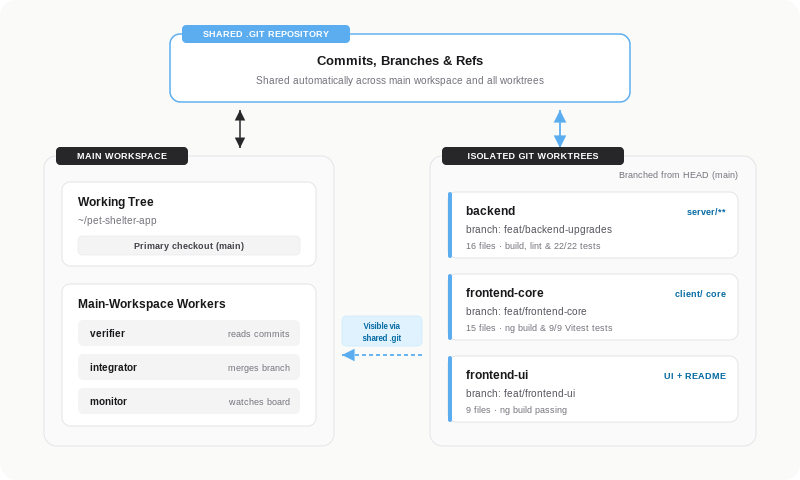
Not every agent in a swarm needs its own Git worktree. Only the workers that edit files and run builds at the same time need one.
When the coordinator starts the three coding workers, the Antigravity CLI creates a separate Git worktree from main for each one automatically. Because every worktree has its own working directory, all three workers install packages, compile code, and run tests at the same time without locking node_modules or overwriting each other’s edits.
Each worker creates its own branch, commits its changes, and posts @verifier [done] on the shared board:
backend. Updated 16 files underserver/onfeat/backend-upgrades, with build, lint, and 22/22 tests passing.frontend-ui. Updated 9 files (README.mdand UI components) onfeat/frontend-ui, withng buildpassing.frontend-core. Updated 15 files underclient/onfeat/frontend-core, withng buildand 9/9 Vitest tests passing.
Pay attention to one detail: Git worktrees branch from HEAD, so they do not copy uncommitted changes sitting in your main workspace. Any changes you want parallel workers to see should be committed first.
Step 3: Independent Verification and Clean Integration
As each worker finishes, verifier checks the diffs right away. Because all Git worktrees share the same .git repository, verifier can read those branches immediately without pushing or pulling anything. Once all three branches pass review, build, lint, and tests, verifier notifies the coordinator.
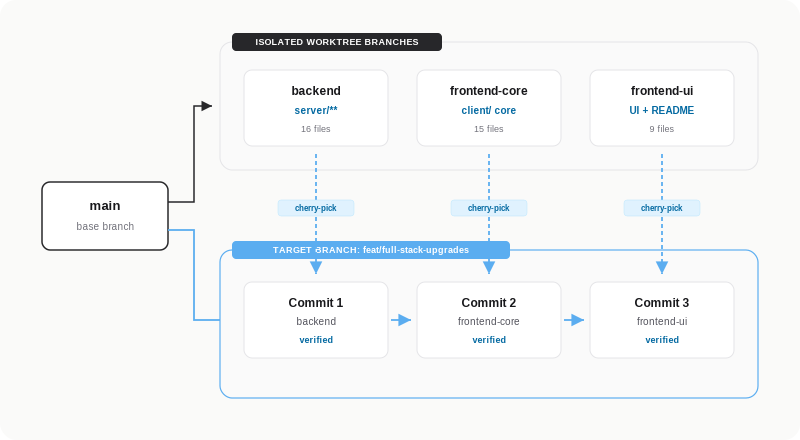
Next, the coordinator starts a sixth worker, integrator, directly in the main workspace. The integrator creates the target branch and cherry-picks the three verified worker branches on top:
git checkout -b feat/full-stack-upgrades
git cherry-pick feat/backend-upgrades feat/frontend-core feat/frontend-ui
Then integrator runs the full verification suite (npm ci, npm run build, npm run lint, and npm test) across both server/ and client/.
Once all commits are safely on feat/full-stack-upgrades and the tests are green, the coordinator shuts down the finished workers and cleans up their worktrees. Always make sure work is merged or cherry-picked before stopping a worker, since removing a worker permanently deletes its worktree folder.
Step 4: The Final PR
With a clean commit history and passing tests across the stack, we push the branch and open a Pull Request with three focused commits:
feat(frontend-ui): font preconnect, view transitions, native popover API, and docs
feat(client): modernize to Angular 21 signals, fix bugs, a11y, view transitions, and add Vitest
feat(server): upgrade Express 5/TS/ESLint, fix bugs, add security middleware & tests
As you can see, each commit focuses on one part of the app, so the Pull Request is much easier to review.
Conclusion
Running multiple coding agents in parallel works well when each agent owns a clear set of files and has its own worktree to build and test safely. With /swarm and Gemini 4 Neon in the Antigravity CLI, I upgraded an Angular and Node.js app in about 12 minutes without dealing with a single merge conflict. If you have a backlog of refactoring or upgrade tasks waiting in a repo, give /swarm a try.
You can follow me on Twitter and GitHub to see more about my work.
Thank you for reading!
— Luis Aviles